
Island
Screenshots
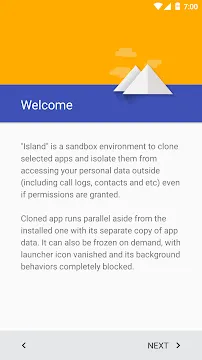
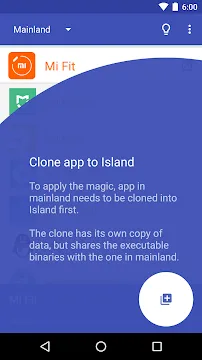
Island App For Android offers a unique way to manage your mobile environment by creating a secure and isolated sandbox on your device. Many users want to separate their personal data from work applications or suspicious software. This application uses the built-in Android “Work Profile” feature to divide your system into two distinct territories. You can clone existing apps into this secondary space to run them independently from your main profile. It ensures that your private messages, photos, and contacts remain invisible to the apps living inside the island.
The software acts as a specialized manager for your device’s hidden capabilities. It allows you to freeze background processes and prevent specific applications from accessing your personal information. By isolating a “bad” app, you can still use its features without letting it track your behavior or drain your battery. The interface remains clean and provides a direct list of all installed software for easy management. Whether you want to maintain professional boundaries or improve your digital privacy, this tool gives you the control you need.
Isolate Apps for Maximum Privacy
Island creates a digital barrier that stops applications from talking to each other. When you move an app into the isolated space, it can only see the data within that specific profile. It cannot access your main gallery, call logs, or location history unless you explicitly allow it. This is perfect for apps that demand too many permissions just to function. You can enjoy the software while keeping your primary identity completely safe.
The isolation feature also protects you from intrusive tracking and data collection. Many social media apps try to scan your entire phone to build a profile on you. By trapping them inside the island, you limit their reach to a very small and empty environment. This proactive approach to security puts you back in charge of your own hardware. Your phone stays yours, even when you install demanding software.
Clone Applications for Multiple Accounts
The ability to clone apps is one of the most popular features of this tool. You can create an exact copy of a messaging app or a game to use with a different account. This allows you to stay logged into your work and personal profiles at the same time. You do not have to sign out and sign back in whenever you want to check a different message. Both versions of the app run side-by-side with total stability.
Cloning also helps you test different app settings without affecting your main setup. You can experiment with new features or configurations in the island version first. If something goes wrong, your original app remains perfectly intact and functional. This flexibility makes the tool essential for power users and developers who want to push their devices further.
Freeze Background Apps to Save Battery
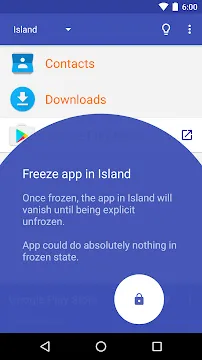
Many applications continue to run in the background even after you close them. They consume your RAM and drain your battery throughout the day. Island includes a “Greenify” style feature that lets you freeze these apps instantly. When an app is frozen, it cannot perform any background tasks or send notifications. It stays completely dormant until the moment you decide to open it again.
- Stop background data usage from hungry apps.
- Increase your phone’s overall speed by freeing up memory.
- Prevent apps from waking up your device at night.
- Reduce the heat generated by constant CPU activity.
By managing your apps this way, you can significantly extend your battery life. You choose which apps deserve to run and which ones should stay quiet. This manual control ensures that your device remains fast and responsive for the tasks that actually matter.
Create a Professional Work Boundary
Maintaining a work-life balance is difficult when your office is in your pocket. Island helps by creating a dedicated work profile that you can turn off with one switch. You can put all your work-related email and chat apps into the island. When your workday ends, you simply disable the profile to stop all work notifications instantly. It allows you to enjoy your evening without being interrupted by professional alerts.
This division also keeps your company’s data secure. If your employer requires specific security apps, you can keep them inside the island. They will not have the power to monitor your personal photos or browsing history. It provides a professional solution that respects your personal privacy and your mental health.
Hide Apps from the Main Menu
Privacy often involves hiding specific apps from curious eyes. Island allows you to hide cloned apps so they do not appear in your main app drawer. You can access them through the Island interface whenever you need them. This is an excellent way to keep sensitive tools or private games out of sight. It adds an extra layer of secrecy to your mobile device without needing complex launchers.
The app also prevents hidden apps from appearing in the “Recent Apps” list of your main profile. This ensures that a preview of your activity does not show up when you switch between tasks. Your secrets remain buried deep within the isolated space where only you can find them. It turns your smartphone into a more private and secure personal assistant.
Optimize System Performance with App Ops
The software provides a deep look into how your apps behave on your system. You can use the integrated tools to see exactly which permissions an app uses. It allows you to revoke specific rights that might be unnecessary for the app’s function. This fine-tuned control prevents “permission creep” where apps slowly gain more access over time. You can keep your system lean and secure with very little effort.
Regular updates ensure that the tool stays compatible with the latest Android security patches. It adapts to new system requirements to provide a consistent experience across different brands of phones. You get a professional-grade management suite that treats your device with care. It empowers you to customize your mobile experience to fit your exact needs and lifestyle.
Final Thoughts
Island App For Android is a sophisticated tool for anyone who takes their digital privacy and productivity seriously. By utilizing the work profile system, it offers a stable and secure way to isolate and clone applications. You can separate your personal life from your professional tasks while protecting your data from intrusive software. The ability to freeze background apps ensures that your device stays fast and your battery lasts longer. With its simple interface and powerful features, it simplifies the complex task of mobile management. You can explore new apps with confidence and maintain total control over your hardware every single day. This application provides the peace of mind and flexibility that modern smartphone users truly need.







